Fiat and E-Wallet Related Endpoints
PHP Cash-In
As shown in the diagram below, the PHP cash-in process includes the following steps:
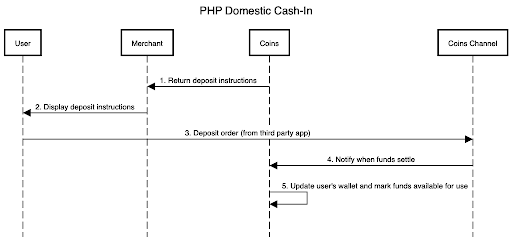
InstaPay/PESONet Cash-In
This module is used for the e-wallet/bank (InstaPay/PESONet) implementation of cash-in operations.
Retrieving User Cash-In Account Information
Method: GET
URL: /merchant-api/fiat/cash-in/info?userId=13530199609
Idempotent: True
Request
Parameter |
Layout |
Required |
Description |
|---|---|---|---|
userId |
Request body |
yes |
User ID in the Merchant’s platform |
Response
"userId" : "1304304339091773722",
"registerStatus" : "success",
"kycStatus" : "lv2"
E-wallet Transfer steps
Select send money to a bank account on your wallet app.
Choose InstaPay/PESONet as transfer option.
Enter the account details and enter the amount you want to cash in.
Bank: DCPay Philippines/Coins.ph
Account Name: Your full name
Account Number: Your union ID number (provided by Coins to route cash-ins to the appropriate merchant and end user account; e.g., “0200000002”)
The amount will be credited to your PHP balance once the transaction has been processed.
Online bank Transfer steps
Choose to transfer funds to another bank account.
Choose InstaPay/PESONet as transfer option.
Enter the account details below and enter the amount you want to cash in.
Bank: DCPay Philippines/Coins.ph
Account Name: Your full name
Account Number: Your union ID number (provided by Coins to route cash-ins to the appropriate merchant and end user account; e.g. “0200000002”)
The amount will be credited to your PHP balance once the transaction has been processed.
Special Instructions
Supports E-wallet/banks see transaction/fiat/query-supported-channels endpoint
Each merchant has a consistent and different merchant prefix code, and union ID number designated to their end user account in order to route an incoming InstaPay or PESONet transfer to the correct merchant’s end user account.
Passive cash-in process description
InstaPay/PESONet cash-in operations need to be initiated from a third-party bank or e-wallet. The specific process is delineated below (Coins.ph e-wallet UI appears only as an example):
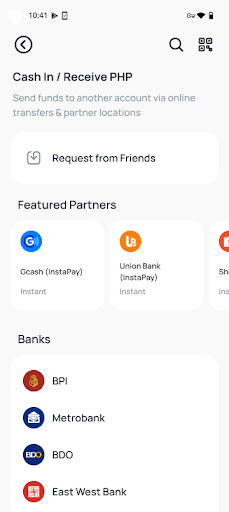
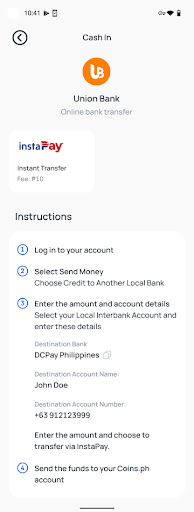
Before initiating a cash-in, you need to query whether the channel is available (using the
transaction/fiat/query-supported-channelsendpoint).Initiate a cash-in application for the Merchant in a third party application (e.g. Maya, GCash, etc.) To cash-in from the Merchant app, follow the instructions in the sample above.
Coins will then process Merchant cash-in requests from banks or e-wallets via InstaPay or PESONet.
A notification of a successful cash-in is sent via a webhook.
The Merchant can query for the corresponding Coins user’s cash-in order history and balance.
PHP Cash-Out
The PHP cash-out process is launched when a user initiates a withdrawal and the withdrawal request is passed from Merchant to Coins, who then submits it to the payment channel. Upon receiving a success notification from the payment channel, Coins debits the user’s wallet.
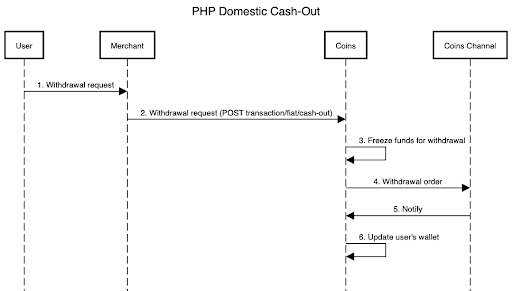
InstaPay/PESONet Cash-Out
This endpoint is used to provide InstaPay/PESONet cash-outs. Note that this operation is asynchronous.
Method: POST
URL: /merchant-api/transaction/fiat/cash-out
Idempotent: True
Request
Parameter |
Layout |
Required |
Description |
|---|---|---|---|
userId |
Request body |
yes |
User ID in the Merchant’s platform |
amount |
Request body |
yes |
Cash-out amount |
currrency |
Request body |
yes |
PHP |
channelName |
Request body |
yes |
Cash-out channel (InstaPay or PESONet) |
recipientName |
Request body |
yes |
Name of payee/recipient |
recipientBank |
Request body |
yes |
Receiving bank or e-wallet identification number. Can be found in the |
recipientAccountNumber |
Request body |
yes |
Recipient account |
internalOrderId |
Request body |
yes |
Merchant’s reference number |
Upon completion, the request returns the internal and external IDs of the newly created order and its current status.
Response
{
        "externalOrderId":"D202208213327", // Coins.ph reference number
        "internalOrderId":"123",
        "orderStatus":"pending" // pending, success, failed
}
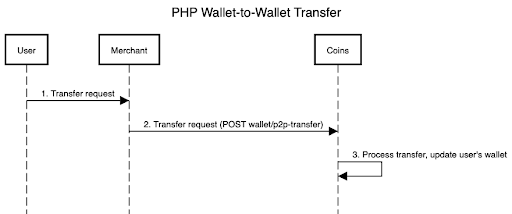
PHP Wallet-to-Wallet Transfer
A wallet-to-wallet (P2P) fund transfer involves the following steps: A user initiates the request and the transfer request is passed from Merchant to Coins. Upon receiving the request, Coins executes the transfer and updates the user’s wallet. For endpoint details, please refer to P2P Transfer.
Fetching Supported Channels
This endpoint fetches the channels that Coins Access supports for various transactions.
Method: POST
URL: /merchant-api/transaction/fiat/query-supported-channels
Idempotent: True
Request
Parameter |
Layout |
Required |
Description |
|---|---|---|---|
userId |
Request body |
yes |
User ID in the Merchant’s platform |
transactionType |
Request body |
yes |
Cash-in/cash-out |
currency |
Request body |
yes |
PHP |
Response
{
    "data":[
        {
            "transactionChannel":"INSTAPAY", // channel code
            "transactionChannelName":"Instapay", // channel name
            "transactionSubject":"gcash", // bank or e-wallet code
            "transactionSubjectName":"GCash", // bank or e-wallet name
            "transactionType":"-1", // 1: cash-in; -1: cash-out
            "channelIcon":"http://www.icon.com/instapay", //channel icon
            "subjectIcon":"http://www.icon.com/gcash",// bank or e-wallet icon
            "Maximum":"10000000", // Single ratio maximum limit
            "minimum":"100000",  // Single ratio minimum limit
            "dailyLimit":"100000",
            "monthlyLimit":"100000",
            "annualLimit":"100000",
            "Precision":"2",
            "maxWithdrawBalance" : "100000", // The maximum balance that the user can withdraw at a time
            "status" : "1" // 1: available, -1: unavailable

        },
        {
            "transactionChannel":"PESONET",
            "transactionChannelName":"Pesonet",
            "transactionSubject":"maya",
            "transactionSubjectName":"Maya",
            "transactionType":"-1",
            "channelIcon":"http://www.icon.com/instapay",
            "subjectIcon":"http://www.icon.com/maya",
            "maximum":"10000000",
            "minimum":"100000",
            "dailyLimit":"100000",
            "monthlyLimit":"100000",
            "annualLimit":"100000",
            "precision":"2",
            "maxWithdrawBalance" : "100000",
            "status" : "1"
        }
    ],
    "status":"0",
    "error": "ok"
}
Fetching Channel Payment Details
This endpoint fetches the details of a specific channel.
Method: POST
URL: /merchant-api/transaction/query-channel-payment-details
Idempotent: True
Request
Parameter |
Layout |
Required |
Description |
|---|---|---|---|
userId |
Request body |
yes |
User ID in the Merchant’s platform |
transactionType |
Request body |
yes |
Cash-in/cash-out |
channelCode |
Request body |
yes |
Channel code, e.g., Instapay |
Response
{
    "bank" : "UnionBank",
    "accountNo" : "432324153232"
}
Fetching Transaction History
This endpoint fetches the history of user transactions, including P2P transfer history.
Method: POST
URL: /merchant-api/transaction/query-user-transaction-history
Idempotent: True
Request
{
   "userId" : "10001",
   "begin"  : "2021-10-19 13:01:43.0",
   "end"    : "2021-11-19 13:01:43.0"
}
Response
[
   "orderId" : "155080d1d55f4b909c831492425046d5",
   "orderType" : "Payment" //  Deposit/Withdraw
   "amount"   : "200",
   "currency" : "PHP",
   "paymentId": "1305983960896119622",
   "channelCode" : "CA00001",
   "channelName" : "Starbucks",
   "status" : "success",
   "description" : "Sugar-free coffee"
   "createAt" : "2021-11-11 11:01:43.0"
]